We're here to help.

Got a question? Need a hand? Start with the in-app Support widget — AI-powered answers, a searchable knowledge base, and ticket submission, all built into My Care CRM. If your system is down or you can't sign in, email us or call and we'll sort it out.

AI-assisted first response Mon–Fri, 9am–5pm AWST Included in your subscription
CareWolf, the My Care CRM mascot, wearing a customer support headset — friendly help for NDIS providers

Three ways to reach us

Pick the channel that fits the situation. Tickets give us the most context; phone is best for urgent issues.

Email our support team

Best when you can't sign in to the platform, or when you need to attach files, screenshots or screen recordings. Our team will create a ticket on your behalf and respond as soon as possible.

Replies during Australian business hours

Call us

If you'd rather speak to someone, the support line is answered by our AI support assistant. It can resolve most questions on the spot or open a ticket on your behalf for the team to follow up. Best for urgent situations where the in-app widget isn't an option.

Mon–Fri, 9am–5pm AWST

AI-powered help, articles, and tickets — built in

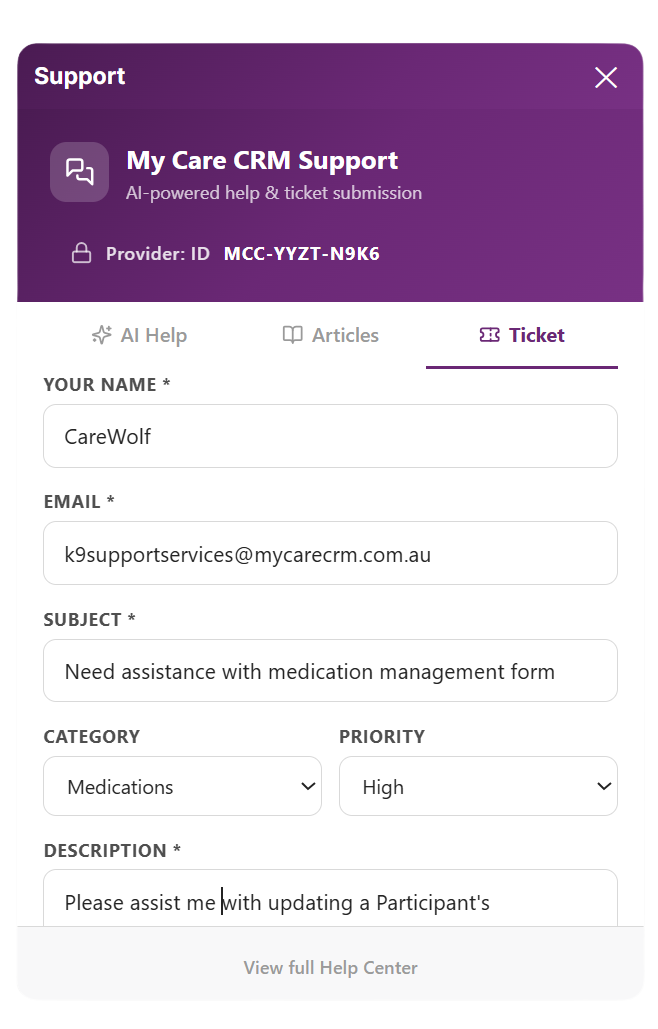
Every screen in My Care CRM has a Support icon. Click it and you get a private, organisation-scoped help panel — no leaving the app, no losing your work, no switching tabs.

  • AI Help — natural-language Q&A trained on the My Care CRM platform. Resolves the majority of "how do I…" questions instantly.
  • Articles — searchable knowledge base of how-to guides, policies, and walkthroughs. Indexed by feature, role, and module.
  • Tickets — structured submission with category, priority, and description. Tickets are tied to your provider ID for fast routing.
  • Provider-scoped — your tickets, articles and AI history are kept inside your organisation. We never mix one provider's data with another's.
Sign in to open the widget
Screenshot of the My Care CRM in-app Support widget showing AI Help, Articles, and Ticket submission tabs, with a sample ticket about a medication management form

Common support questions

Quick answers to the questions we get most often. Can't find what you're looking for? Open a ticket and we'll get back to you.

What is the easiest way to get help with My Care CRM?

If you can sign in to the platform, the in-app Support widget is the easiest place to start. Click the support icon in the lower right of any page in My Care CRM to open AI-assisted help, browse knowledge base articles, or submit a ticket directly. The AI assistant resolves most queries instantly.

If your system is down or you can't sign in, email [email protected] or call 1300 316 543 — our AI support assistant will help or open a ticket on your behalf.

How do I submit a support ticket if I can't log in?

Email [email protected] with a description of the issue, your organisation name, and any screenshots or error messages. Our team will create a ticket on your behalf and respond as soon as possible.

For urgent issues, call 1300 316 543 during business hours (Mon–Fri, 9am–5pm AWST) — our AI support assistant will help or open a ticket on your behalf.

What are My Care CRM's support hours?

Phone and live ticket triage is available Monday to Friday, 9am–5pm AWST. Tickets and emails received outside these hours are queued and worked through in priority order the next business day.

Critical incidents (platform-wide outages) are monitored 24/7.

How quickly will you respond to my support request?

Response times depend on the priority you select when logging the ticket. Critical (system-down) issues are acknowledged within 1 business hour. High priority issues (significant feature impact) are acknowledged within 4 business hours. Standard issues are responded to within 1 business day.

Detailed Service Level commitments are set out in Annexure C of our End User Licence Agreement.

What's the difference between AI Help, Articles, and Tickets?

AI Help is an AI-powered assistant that answers natural-language questions about the platform — try this first; it resolves most queries instantly.

Articles is a searchable knowledge base of how-to guides and policies.

Tickets is for issues that need a human — submit a structured request, choose a category and priority, and our team will follow up by email.

What information should I include when contacting support?

Include your organisation name, the user account experiencing the issue, a clear description of what you were trying to do, what you expected to happen, and what actually happened. Attach screenshots or screen recordings if possible. Include any error messages verbatim.

The more context you provide up front, the faster we can resolve your issue.

Does support cost extra?

No. Email, in-app and phone support during business hours is included in your subscription at no extra cost. There are no support tiers, no per-incident charges, and no upsell to a higher plan to access human help. Support is a feature, not a product.

Can I request a feature or report a bug?

Yes. Submit a ticket through the in-app widget and choose Feature Request or Bug Report as the category. Feature requests are triaged into the product roadmap. Bugs are routed to the engineering team — confirmed bugs are typically fixed in the next release cycle.

Still need a hand?

Tickets are best for record-keeping and follow-up. Phone is best for urgent issues. Either way, we'll help you sort it out.